SQL
The SQL plugin can be used to get run queries against a SQL database. Currently we are supporting ClickHouse, Postgres and MySQL databases.
Configuration
To use the SQL plugin the following configuration is needed in the satellites configuration file:
| Field | Type | Description | Required |
|---|---|---|---|
| name | string | The name of the SQL plugin instance. | Yes |
| type | sql |
The type for the SQL plugin. | Yes |
| options.connection | string | The connection string, to connect to a SQL database. | Yes |
| options.driver | string | The driver which should be used for the database instance. This must be clickhouse, postgres or mysql. |
Yes |
plugins:
  - name: sql
    type: sql
    options:
      connection:
      driver:
Insight Options
Note
The SQL plugin can not be used within the insights section of an application.
Variable Options
Note
The SQL plugin can not be used to get a list of variable values.
Panel Options
The following options can be used for a panel with the SQL plugin:
| Field | Type | Description | Required |
|---|---|---|---|
| type | string | The type which should be used to visualize the data. This can be table or chart. |
Yes |
| queries | []Query | A list of queries, which can be selected by the user. This is required when the type is set to table. |
No |
| chart | Chart | Settings to render the results of a query in a chart. This is required when the type is set to chart. |
No |
Query
| Field | Type | Description | Required |
|---|---|---|---|
| name | string | A name for the SQL query, which is displayed in the select box. | Yes |
| query | string | The query which should be run against the configured SQL database. | Yes |
| columns | map |
A map of columns to format the returned data for a query. The key must match the returned column name. | No |
Column
| Field | Type | Description | Required |
|---|---|---|---|
| title | string | Set a title for the column. | No |
| unit | string | A unit which should be displayed behind the column value. If this is time we automatically try to auto format the column to the users local time. |
No |
Chart
| Field | Type | Description | Required |
|---|---|---|---|
| type | string | The chart type. This could be pie, line or area. |
Yes |
| query | string | The query which which results should be used in the chart. | Yes |
| pieLabelColumn | string | The name of the column which should be used for the labels in the pie chart. This is required when the type is pie. |
No |
| pieValueColumn | string | The name of the column which should be used for the values in the pie chart. This is required when the type is pie. |
No |
| xAxisColumn | string | The column which should be used for the x axis. This is required when the type is line or area. |
No |
| xAxisType | string | The type for the x axis. This could be empty or time. |
No |
| xAxisUnit | string | The unit which should be used for the x axis. | No |
| yAxisColumns | []string | A list of columns which should be shown for the y axis. This is required when the type is line or area. |
No |
| yAxisUnit | string | The unit for the y axis. | No |
| yAxisStacked | boolean | When this is true the values of the y axis are stacked. |
No |
| legend | map |
A map of string pairs, to set the displayed title for a column in the legend. The key is the column name as returned by the query and the value is the shown title. | No |
Usage
Application
---
apiVersion: kobs.io/v1
kind: Application
metadata:
  name: example-application
  namespace: kobs
spec:
    dashboards:
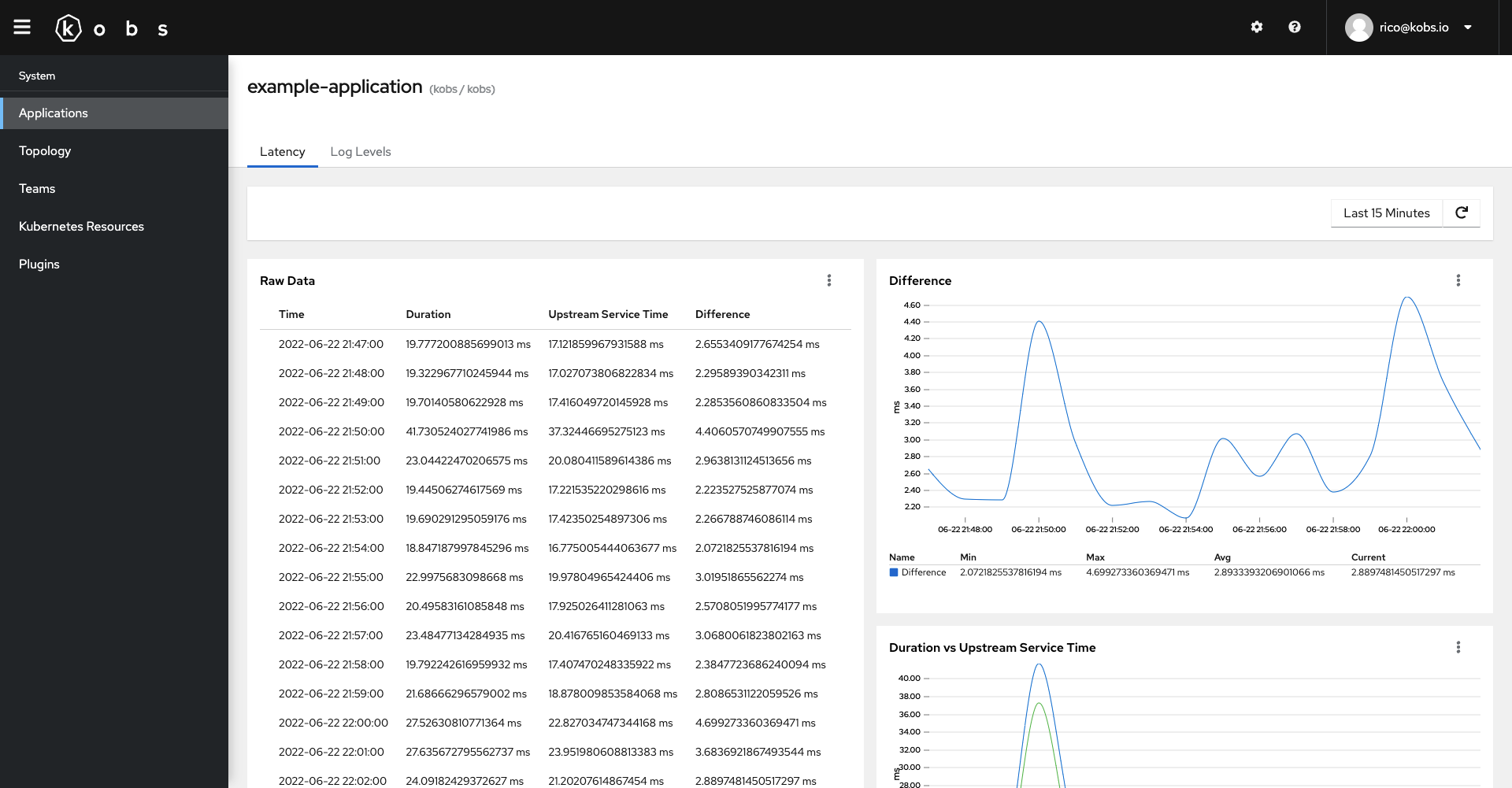
      - title: Latency
        inline:
          rows:
            - size: 3
              panels:
                - title: Raw Data
                  colSpan: 6
                  rowSpan: 2
                  plugin:
                    name: sql
                    type: sql
                    options:
                      type: table
                      queries:
                        - name: Duration and Upstream Service Time
                          query: |
                            SELECT
                              toStartOfInterval(timestamp, INTERVAL 60 second) AS time,
                              avg(fields_number.value[indexOf(fields_number.key, 'content.duration')]) as avg_duration,
                              avg(fields_number.value[indexOf(fields_number.key, 'content.upstream_service_time')]) as avg_ust,
                              avg_duration - avg_ust as avg_diff
                            FROM
                              logs.logs
                            WHERE
                              timestamp >= FROM_UNIXTIME({% .__timeStart %})
                              AND timestamp <= FROM_UNIXTIME({% .__timeEnd %})
                              AND namespace='myservice'
                              AND app='myservice'
                              AND container_name='istio-proxy'
                              AND match(fields_string.value[indexOf(fields_string.key, 'content.upstream_cluster')], '^inbound.*')
                            GROUP BY
                              time
                            ORDER BY
                              time
                          columns:
                            time:
                              title: Time
                              unit: time
                            avg_duration:
                              title: Duration
                              unit: ms
                            avg_ust:
                              title: Upstream Service Time
                              unit: ms
                            avg_diff:
                              title: Difference
                              unit: ms

                - title: Difference
                  colSpan: 6
                  plugin:
                    name: sql
                    type: sql
                    options:
                      type: chart
                      chart:
                        type: line
                        query: |
                          SELECT
                            toStartOfInterval(timestamp, INTERVAL 60 second) AS time,
                            avg(fields_number.value[indexOf(fields_number.key, 'content.duration')]) - avg(fields_number.value[indexOf(fields_number.key, 'content.upstream_service_time')]) as avg_diff
                          FROM
                            logs.logs
                          WHERE
                            timestamp >= FROM_UNIXTIME({% .__timeStart %})
                            AND timestamp <= FROM_UNIXTIME({% .__timeEnd %})
                            AND namespace='myservice'
                            AND app='myservice'
                            AND container_name='istio-proxy'
                            AND match(fields_string.value[indexOf(fields_string.key, 'content.upstream_cluster')], '^inbound.*')
                          GROUP BY
                            time
                          ORDER BY
                            time
                        xAxisColumn: time
                        xAxisType: time
                        yAxisColumns:
                          - avg_diff
                        yAxisUnit: ms
                        yAxisStacked: false
                        legend:
                          avg_diff: Difference

                - title: Duration vs Upstream Service Time
                  colSpan: 6
                  plugin:
                    name: sql
                    type: sql
                    options:
                      type: chart
                      chart:
                        type: line
                        query: |
                          SELECT
                            toStartOfInterval(timestamp, INTERVAL 60 second) AS time,
                            avg(fields_number.value[indexOf(fields_number.key, 'content.duration')]) as avg_duration,
                            avg(fields_number.value[indexOf(fields_number.key, 'content.upstream_service_time')]) as avg_ust
                          FROM
                            logs.logs
                          WHERE
                            timestamp >= FROM_UNIXTIME({% .__timeStart %})
                            AND timestamp <= FROM_UNIXTIME({% .__timeEnd %})
                            AND namespace='myservice'
                            AND app='myservice'
                            AND container_name='istio-proxy'
                            AND match(fields_string.value[indexOf(fields_string.key, 'content.upstream_cluster')], '^inbound.*')
                          GROUP BY
                            time
                          ORDER BY
                            time
                        xAxisColumn: time
                        xAxisType: time
                        yAxisColumns:
                          - avg_duration
                          - avg_ust
                        yAxisUnit: ms
                        yAxisStacked: false
                        legend:
                          avg_duration: Duration
                          avg_ust: Upstream Service Time

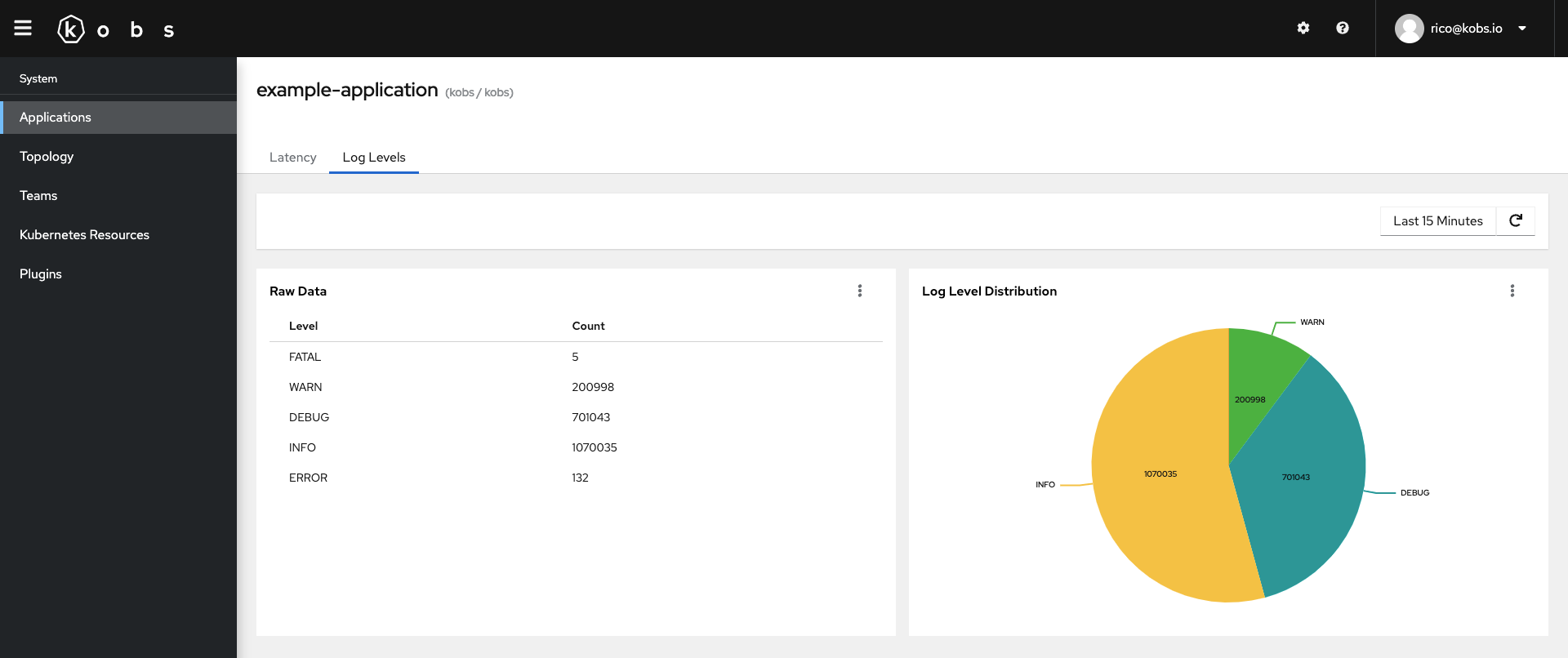
      - title: Log Levels
        inline:
          rows:
            - size: 3
              panels:
                - title: Raw Data
                  colSpan: 6
                  plugin:
                    name: sql
                    type: sql
                    options:
                      type: table
                      queries:
                        - name: Log Levels
                          query: |
                            SELECT
                              content.level,
                              count(content.level) as count_data
                            FROM
                              logs.logs
                            WHERE
                              timestamp >= FROM_UNIXTIME({% .__timeStart %})
                              AND timestamp <= FROM_UNIXTIME({% .__timeEnd %})
                              AND namespace='myservice'
                              AND app='myservice'
                              AND container_name='myservice'
                            GROUP BY
                              content.level
                          columns:
                            content.level:
                              title: Level
                            count_data:
                              title: Count
                - title: Log Level Distribution
                  colSpan: 6
                  plugin:
                    name: sql
                    type: sql
                    options:
                      type: chart
                      chart:
                        type: pie
                        query: |
                          SELECT
                            content.level,
                            count(content.level) as count_data
                          FROM
                            logs.logs
                          WHERE
                            timestamp >= FROM_UNIXTIME({% .__timeStart %})
                            AND timestamp <= FROM_UNIXTIME({% .__timeEnd %})
                            AND namespace='myservice'
                            AND app='myservice'
                            AND container_name='myservice'
                          GROUP BY
                            content.level
                        pieLabelColumn: content.level
                        pieValueColumn: count_data